
Generate 4o Image(GPT IMAG 1)
Create a new 4o Image(gpt image 1) generation task. Generated images are stored for 14 days, after which they expire.
Rate limits and quotas are enforced by Apikley and may differ from upstream providers.
OpenAPI
4o-image-api/4o-image-api.json post /api/v1/gpt4o-image/generate
openapi: 3.0.0
info:
title: 4o Image API-GPT Image 1
description: Apikley 4o Image API Documentation
version: 1.0.0
contact:
name: Technical Support
email: support@apikley.ru
servers:
- url: https://api.apikley.ru
description: API Server
security:
- BearerAuth: []
paths:
/api/v1/gpt4o-image/generate:
post:
summary: Generate 4o Image
description: >-
Create a new 4o Image generation task. Generated images are stored for
14 days, after which they expire.
operationId: generate-4o-image
requestBody:
required: true
content:
application/json:
schema:
type: object
properties:
prompt:
type: string
description: >-
(Optional) Text prompt that conveys the creative idea you
want the 4o model to render. Required if neither `filesUrl`
nor `fileUrl` is supplied. At least one of `prompt` or
`filesUrl` must be provided.
example: A beautiful sunset over the mountains
filesUrl:
type: array
items:
type: string
format: uri
description: >-
(Optional) Up to 5 publicly reachable image URLs to serve as
reference or source material. Use this when you want to edit
or build upon an existing picture. If you don’t have
reliable hosting, upload your images first via our File
Upload API quick‑start:
https://docs.apikley.ru/file-upload-api/quickstart. Supported
formats: .jfif, .pjpeg, .jpeg, .pjp, .jpg, .png, .webp. At
least one of `prompt` or `filesUrl` must be provided.
example:
- https://example.com/image1.png
- https://example.com/image2.jpg
size:
type: string
description: >-
(Required) Aspect ratio of the generated image. Must be one
of the listed values.
enum:
- '1:1'
- '3:2'
- '2:3'
example: '1:1'
nVariants:
type: integer
description: >-
(Optional) How many image variations to produce (1, 2,
or 4). Each option has a different credit cost—see
up‑to‑date pricing at https://app.apikley.ru/billing. Default is 1.
enum:
- 1
- 2
- 4
example: 1
maskUrl:
type: string
format: uri
description: >-
(Optional) Mask image URL indicating areas to modify (black)
versus preserve (white). The mask must match the reference
image’s dimensions and format (≤ 25 MB). When more than one
image is supplied in `filesUrl`, `maskUrl` is ignored.
Example:
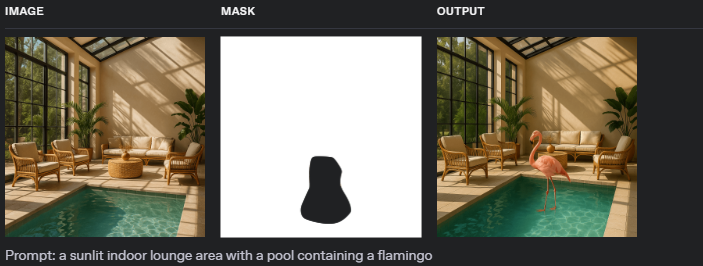
In the image above, the left side shows the original image,
the middle shows the mask image (white areas indicate parts
to be preserved, black areas indicate parts to be modified),
and the right side shows the final generated image.
example: https://example.com/mask.png
callBackUrl:
type: string
format: uri
description: >-
The URL to receive 4o image generation task completion
updates. Optional but recommended for production use.
- System will POST task status and results to this URL when
4o image generation completes
- Callback includes generated image URLs and task
information for all variations
- Your callback endpoint should accept POST requests with
JSON payload containing image generation results
- For detailed callback format and implementation guide, see
[4o Image Generation
Callbacks](https://docs.apikley.ru/4o-image-api/generate-4-o-image-callbacks)
- Alternatively, use the Get 4o Image Details endpoint to
poll task status
example: https://your-callback-url.com/callback
isEnhance:
type: boolean
description: >-
(Optional) Enable prompt enhancement for more refined
outputs in specialised scenarios (e.g., 3D renders).
Default false.
example: false
uploadCn:
type: boolean
description: >-
(Optional) Choose the upload region. `true` routes uploads
via China servers; `false` via non‑China servers.
example: false
enableFallback:
type: boolean
description: >-
(Optional) Activate automatic fallback to backup models
(e.g., Flux) if GPT‑4o image generation is unavailable.
Default false.
example: false
fallbackModel:
type: string
description: >-
(Optional) Specify which backup model to use when the main
model is unavailable. Takes effect when enableFallback is
true. Available values: GPT_IMAGE_1 or FLUX_MAX. Default
value is FLUX_MAX.
enum:
- GPT_IMAGE_1
- FLUX_MAX
default: FLUX_MAX
example: FLUX_MAX
fileUrl:
type: string
format: uri
description: >-
(Optional, Deprecated) File URL, such as an image URL. If
fileUrl is provided, 4o image may create based on this
image. This parameter will be deprecated in the future,
please use filesUrl instead.
example: https://example.com/image.png
deprecated: true
required:
- size
example:
filesUrl:
- https://example.com/image1.png
- https://example.com/image2.png
prompt: A beautiful sunset over the mountains
size: '1:1'
callBackUrl: https://your-callback-url.com/callback
isEnhance: false
uploadCn: false
nVariants: 1
enableFallback: false
fallbackModel: FLUX_MAX
responses:
'200':
description: Request successful
content:
application/json:
schema:
allOf:
- type: object
properties:
code:
type: integer
enum:
- 200
- 400
- 401
- 402
- 404
- 422
- 429
- 455
- 500
- 550
description: >-
Response Status Codes
- **200**: Success - Request has been processed
successfully
- **400**: Format Error - The parameter is not in a
valid JSON format
- **401**: Unauthorized - Authentication credentials
are missing or invalid
- **402**: Insufficient Credits - Account does not
have enough credits to perform the operation
- **404**: Not Found - The requested resource or
endpoint does not exist
- **422**: Validation Error - The request parameters
failed validation checks
- **429**: Rate Limited - Request limit has been
exceeded for this resource
- **455**: Service Unavailable - System is currently
undergoing maintenance
- **500**: Server Error - An unexpected error occurred
while processing the request
- Build Failed - vocal removal generation failed
- **550**: Connection Denied - Task was rejected due
to a full queue, likely caused by source site's
issues. Please contact the administrator to confirm.
msg:
type: string
description: Error message when code != 200
example: success
- type: object
properties:
data:
type: object
properties:
taskId:
type: string
description: >-
Task ID, can be used with [Get 4o Image
Details](/4o-image-api/get-4-o-image-details) to
query task status
example: task12345
example:
code: 200
msg: success
data:
taskId: task12345
'500':
$ref: '#/components/responses/Error'
callbacks:
on4oImageGenerated:
'{$request.body#/callBackUrl}':
post:
summary: 4o Image Generation Task Callback
description: >-
When the 4o Image task is completed, the system will send the
result to your provided callback URL via POST request
requestBody:
required: true
content:
application/json:
schema:
type: object
properties:
code:
type: integer
description: >-
Response Status Codes
- **200**: Success - Image generation completed
successfully
- **400**: Bad Request
- The image content in filesUrl violates content policy
- Image size exceeds maximum of 26214400 bytes
- We couldn't process the provided image file (code=invalid_image_format)
- Your content was flagged by OpenAI as violating content policies
- **451**: Download Failed - Unable to download
image from the provided filesUrl
- **500**: Server Error
- Please try again later
- Failed to get user token
- Failed to generate image
- GPT 4O failed to edit the picture
- null
enum:
- 200
- 400
- 451
- 500
msg:
type: string
description: Status message
example: success
data:
type: object
properties:
taskId:
type: string
description: Task ID
example: task12345
info:
type: object
properties:
result_urls:
type: array
items:
type: string
description: List of generated image URLs
example:
- https://example.com/result/image1.png
example:
code: 200
msg: success
data:
taskId: task12345
info:
result_urls:
- https://example.com/result/image1.png
responses:
'200':
description: Callback received successfully
components:
responses:
Error:
description: Server Error
securitySchemes:
BearerAuth:
type: http
scheme: bearer
bearerFormat: API Key
description: >-
All APIs require authentication via Bearer Token.
Get API Key:
1. Visit [API Key Management Page](https://app.apikley.ru/keys) to get your
API Key
Usage:
Add to request header:
Authorization: Bearer APIKLEY_API_KEY
Note:
- Keep your API Key secure and do not share it with others
- If you suspect your API Key has been compromised, reset it immediately
in the management page
To find navigation and other pages in this documentation, fetch the llms.txt file at: https://docs.apikley.ru/llms.txt